> For the complete documentation index, see [llms.txt](https://doc.5v8.im/llms.txt). Markdown versions of documentation pages are available by appending `.md` to page URLs; this page is available as [Markdown](https://doc.5v8.im/game/apex/fecurity/tis.md).
# Fecurity注入错误提示
{% tabs %}
{% tab title="1." %}
 **出现红字提示手机下载百度翻译拍照翻译即可**
{% endtab %}
{% endtabs %}
{% tabs %}
{% tab title="2.Cheat has already been launched" %}
**修复第一个:**
**下载并运行**
{% embed url="" %}
**出现红字提示手机下载百度翻译拍照翻译即可**
{% endtab %}
{% endtabs %}
{% tabs %}
{% tab title="2.Cheat has already been launched" %}
**修复第一个:**
**下载并运行**
{% embed url="" %}
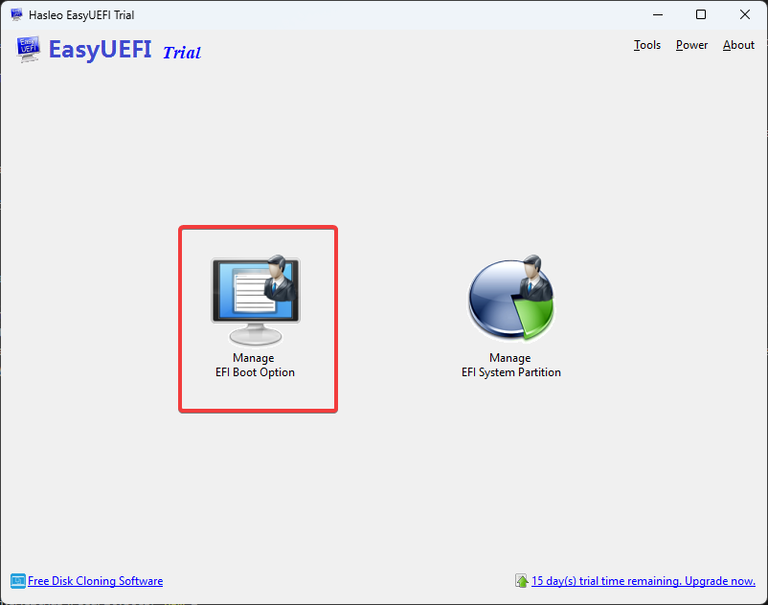 **一个个的查看你的磁碟,并设定其中的档案路径 ****`EFI\Microsoft\Boot\bootmgfw.efi`** **按下第一个按钮即可在所有内容之上**
 **然后重启电脑再尝试注入**
**修复第二个:**
**重启你的电脑并快速按F12进入BIOS页面,选择Windows启动管理员清单中删除,在BISO中将启动优先权变更为Windows启动管理员启动,并重启后继续进行游戏**
{% endtab %}
{% endtabs %}
{% tabs %}
{% tab title="3.Boot files cant be found" %}
**重装系统**
{% endtab %}
{% endtabs %}
{% tabs %}
{% tab title="4.Non UEFI System" %}
**官方教程**
{% embed url="" %}
{% endtab %}
{% endtabs %}
**然后重启电脑再尝试注入**
**修复第二个:**
**重启你的电脑并快速按F12进入BIOS页面,选择Windows启动管理员清单中删除,在BISO中将启动优先权变更为Windows启动管理员启动,并重启后继续进行游戏**
{% endtab %}
{% endtabs %}
{% tabs %}
{% tab title="3.Boot files cant be found" %}
**重装系统**
{% endtab %}
{% endtabs %}
{% tabs %}
{% tab title="4.Non UEFI System" %}
**官方教程**
{% embed url="" %}
{% endtab %}
{% endtabs %}